Configure the Report
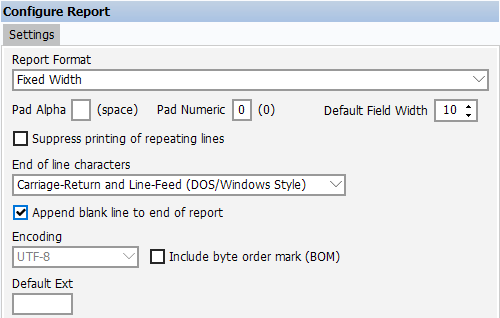
The first step is to configure the report be selecting options shown within the “Configure Report” area of the Extract Report Editor. Click “Report Options” to display the options under the Settings tab.
Note: Although there are three different output report formats, the report design process is virtually identical for all report types.
The Report Format field allows you to select from Fixed Width, Delimited, and XML formatted reports. For this example, the Fixed Width Report Format is being used. Options under the Settings tab apply to all sections within the report, but can be overridden when configuring individual sections. This will be illustrated later in this example.
For this example, numeric characters will be padded with zeroes, and the Default Field Width is changed to 10. The extension can be left blank if you choose to use the default provided by Argos.
Encoding: for the output file, if UTF-8 encoding is selected, you have the option of including the Byte Order Mark (Unicode character) at the start of the text stream.
When saving a report after execution, Argos will use the following default file extensions:
- .txt for fixed width reports
- .txt for delimited reports
- .xml for XML reports
If a default extension is specified in the report configuration, the user will only see that extension in the list of file types when saving the report.