Introduction
These instructions describe how to install, test, and configure MAPS for use in your environment. This document is NOT intended to be a training guide. Once the software has been installed and you have verified proper functioning, we encourage you to take advantage of the various training opportunities you may have purchased, or the free live and recorded training available on our training page.
You can find additional information such as the hardware/software requirements, OLE DB provider installation instructions, and other documentation on our support website. If any problems arise in the installation of this software, please contact Evisions Support and we will be glad to assist.
Overview of MAPS
MAPS stands for Multiple Application Platform Server, and is the server that deploys Evisions’ Higher Education suite of products. By creating a web-based application server, Evisions is able to deploy all of its products via the web. This common server allows a single point of administration for all Evisions Higher Education products.
Key benefits
- Web-deployed client software - no need to manually install applications on user’s computers.
- Central management of resources used by the products (database configuration, users, groups, printers and various security tasks).
- Does not require database drivers on users’ PCs - database calls are performed from the server, which sends results back to users.
- Highly secure - Uses AES encryption for all server to client communication. Web applications such as the launch page and Argos Web Viewer use the secure HTTPS protocol.
- Server-side email queuing and delivery.
- Server-side web deployment of saved reports.
- Single installation for all Evisions Higher Education products - easily install and configure your applications.
Architecture
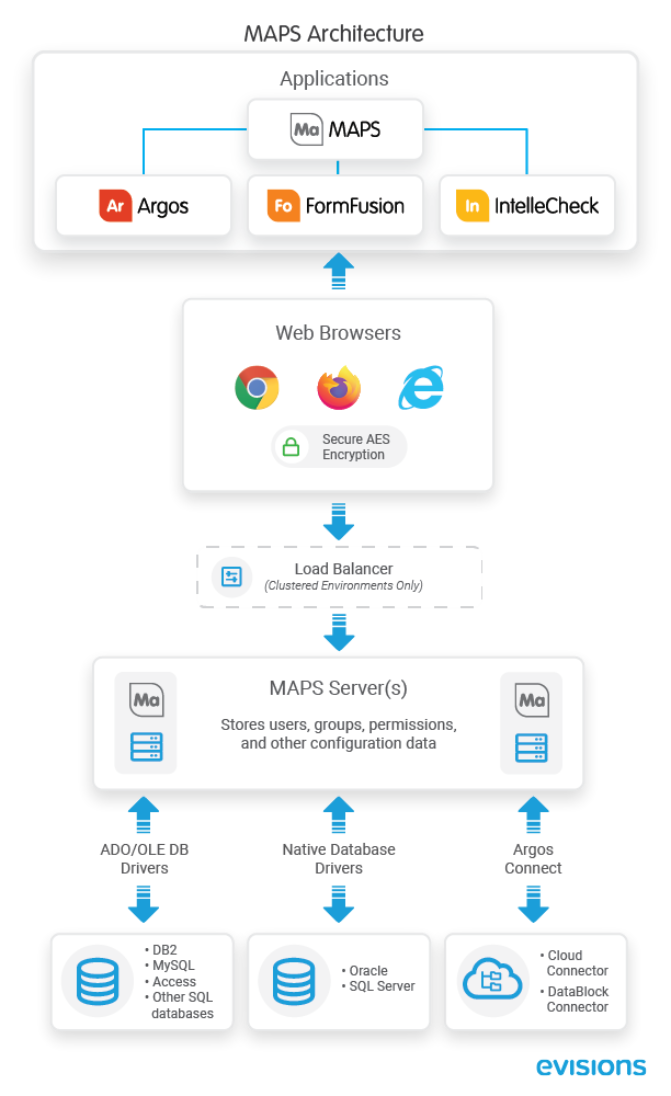
The MAPS server software runs on a server at your institution and deploys the Higher Education applications, including Argos, FormFusion, IntelleCheck, and the MAPS Config application. All applications are Microsoft Windows executable programs that are downloaded to users’ PCs by MAPS. MAPS Config is used by your administrators to configure MAPS.
Application data such as FormFusion templates, Argos DataBlocks and reports, IntelleCheck data, etc. is stored on the server where MAPS is installed. The server also stores MAPS configuration data—your users, groups, permissions, and other information.
Printing, email handling, and FTP access is done from the server, and not from the individual applications. MAPS also handles communication with SQL-based data sources by using the OLE DB providers for each data source.
A clustered installation of MAPS is required in order to use the load balancer.