Auditing
Auditing provides Detail and Summary information about activity on the MAP Server. Beneath the Auditing selection in the Navigation pane, Configuration, Detail, and Summary selections exist which are explained below.
Configuration
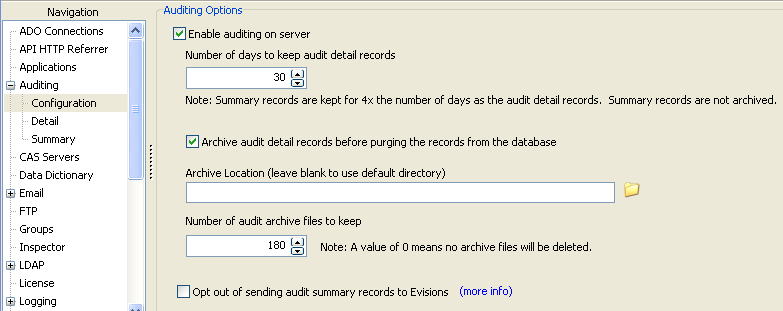
Within this selection the following options are provided:
- Enable auditing on server - Check this box to enable the auditing feature.
- Number of days to keep audit records - Enter the number of days for which audit records are kept. Audit records greater than the value entered will be purged from the Audit log. Audit record purging is performed at 12:15 a.m.
- Archive audit detail records info before purging the records from the database - Check this box if you want to archive Audit records to disk before they are purged.
- Archive Location - specify destination directory where the purged records are to be stored.
- Number of audit archive files to keep – specify the number of audit archive files to keep. If the number of existing audit archive files is greater than the value specified, the oldest files will be deleted. A value of zero means no archive files will be deleted. Deletion occurs only when the default directory is specified (the Archive Location field left blank). If a directory other than the default directory was specified, no archive files will be deleted.
- Opt out of sending summary info to Evisions - Check this box to opt out of sending summary information to Evisions. In an effort to improve our products and performance, we collect product usage statistics to tell us how your system is being used. We do NOT collect user names, credentials, query data or personal information of any kind. You can click the "Summary" section to see the specific information that is shared with Evisions. If you opt out of this program Evisions will not collect any data. Click (more info) to view additional information about this program.
Detail
Selecting Detail provides information about actions performed on the MAP Server. Each action creates a single entry in the audit log, making it much easier to analyze than the server log files. This information is never sent to Evisions (unless you share it with our HelpDesk upon request.)
Recorded actions include:
- Creation/modification, deletion of users and groups.
- Creation/modification of email, print, FTP servers.
- Users accessing the applications.
- Connection creation, modification, deletion.
- Application specific actions such as Folder/DataBlock/Report creation, modify, deletion, execution.
- Schedules created/modified/deleted.
- Others.
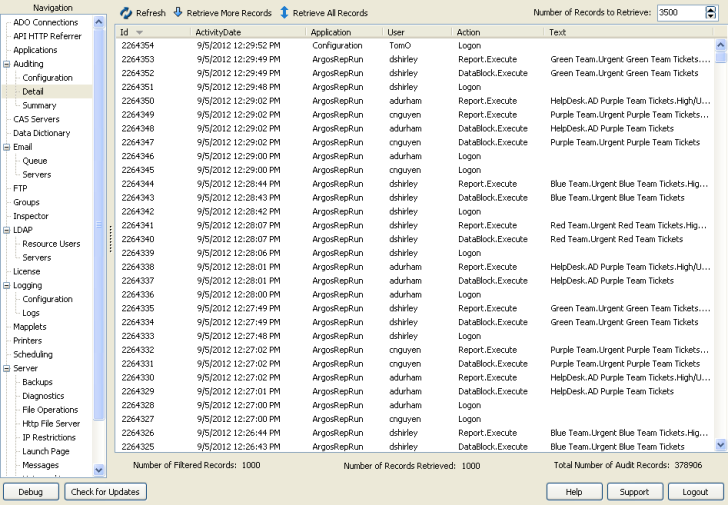
You can click on any column header to sort the column. Alternatively, place the cursor at any location in the report, right-click and you will be presented with the options where you can sort, filter, or save the data to an external file.
Summary
Selecting Summary provides a daily summary of activities grouped by Object Type as shown in the figure below. Note the ValueType column which describes the type of information (either a Count or Amount) provided in the Value column. Summary information is sent to Evisions unless you opt out of doing so (see Configuration section.)
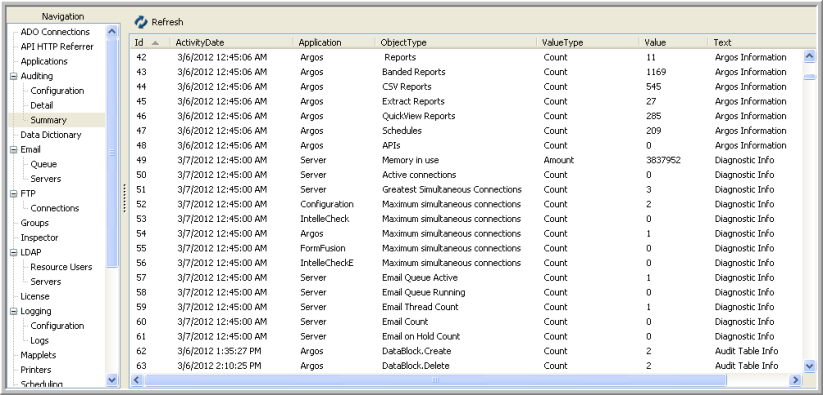
As with the Detail selection, you can click on any column header to sort the column. Alternatively, place the cursor at any location in the report, right-click and you will be presented options to sort, filter, or export the data as a CSV file.