User Roles
MAPS 4.0 includes a significant enhancement to User Types. Since users can now have multiple user types, we now refer to these as “User Roles” instead of “User Types.” In addition to the system roles that have existed in previous versions, administrators will now be able to define their own custom roles.
There are currently five system User Roles provided by MAPS that can be used as-is. Roles will be added for other products in the future. The figure below shows the four system User Roles provided for Argos (Administrator, DataBlock Designer, Report Viewer, and Report Writer) and the Administrator User Role for MAPS. These system User Roles can also be used to create your own custom User Role as described below.
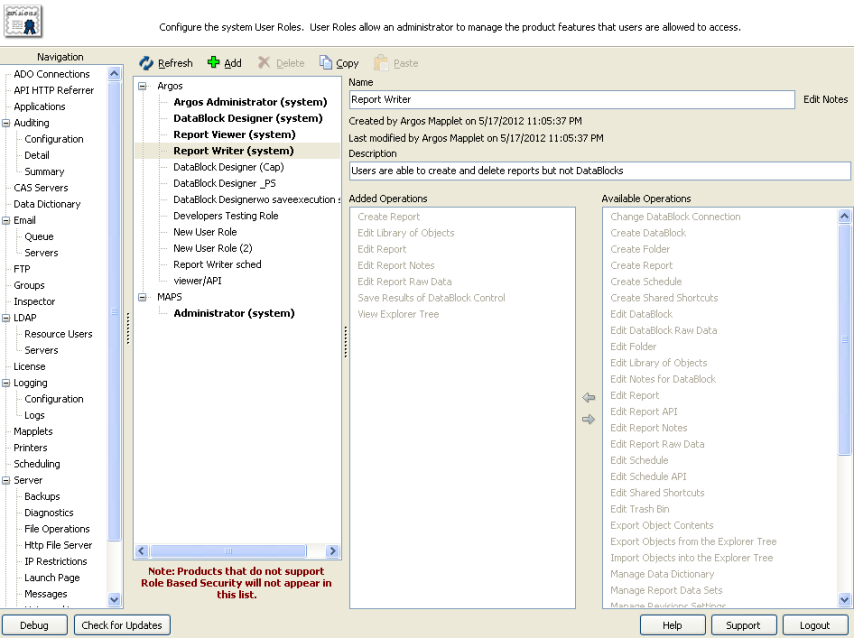
Selecting a User Role displays the Operations that role is allowed to perform (under Added Operations). You can add additional operations from the Available Operations area by double-clicking the desired Operation, dragging-and-dropping it, or using the arrows. Note that you cannot modify the built-in system User Roles; you should instead make a copy of an existing role, or Add a new role.
The Administrator role does not list any Operations as it is not constrained by User Role restrictions. You cannot copy or modify the Administrator role.
You may enter a description and add notes for a User Role (including System Roles.)
Right-clicking on a User Role displays the following menu options:
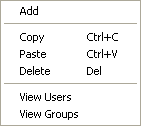
Selecting View Users or View Groups displays the list of Users and/or Groups that have been assigned to this User Role.