Delivery Queue
The Delivery Queue allows you to keep track of out-of-network jobs sent by cloud-based installations of MAPS. If all jobs have been sent as intended, this list will be empty. MAPS will initially attempt to send a job a maximum of five times (each attempt will occur one hour after the previous attempt). After the fifth failed attempt the job will be held in the queue until processing is manually reattempted (this can be done via the right click menu or with the CTRL+H keyboard shortcut), or the job is deleted from the queue. The date and time a job is scheduled to be processed is listed in the Date to Send column.
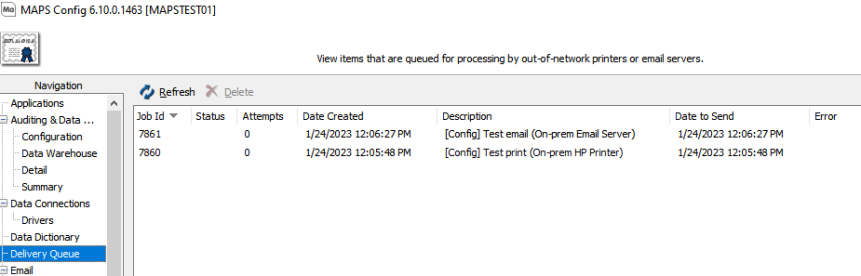
- Job ID - The job ID number.
- Status - The state of the job. Jobs with the Hold status will not be executed by the Evisions Delivery App. After five failed attempts the job status will be set to "Hold".
- Attempts - The number of attempts made to execute the job.
- Date Created - The date the job was created.
- Description - Identifies the parameters for a job. This may include the application, process, environment, etc.
- Date to Send - The date and time the job is scheduled to be executed. If any errors occur, the date to send will be updated.
- Error - Identifies any errors that may have occurred while processing a job.