OAuth2 for Email Servers
OAuth 2 may now be selected from the SMTP Security Level dro-down box, on the Email Server properties dialog. OAuth2 authenticates via digitally created security keys instead of utilizing a username and password. When authenticating an email server using OAuth2, some additional fields become available.
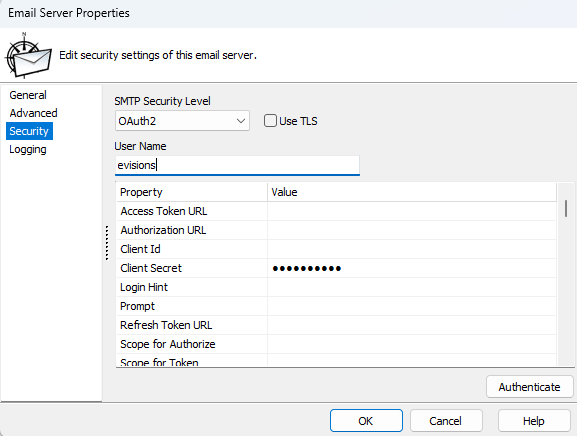
- Access Token URL - the URL to which an authorization code is exchanged for Access Tokens and Refresh Tokens. Depending on the OAuth2 provider, this may also be used for refreshing an Access Token.
- Authorization URL - the URL to which MAPS will send a request to receive an authorization code. This will typically be found in the Authentication section of your API documentation.
- Client Id - an ID unique to your email account. This ID is provided by an OAuth2 provider.
- Client Secret - a confidential value generated by the OAuth2 provider, used when obtaining or refreshing Access Tokens.
- Login Hint - (optional) pre-populates the user name on the sign-in page, if supported by the OAuth2 provider.
- Prompt - (optional) determines the type of sign-in interaction a user will receive when accessing the application.
- Refresh Token URL - (optional) the URL used by MAPS for refreshing an Access Token. If not provided, the Access Token URL is used instead.
- Scope for Authorize - the list of areas within the application to which access is being requested.
- Scope for Token - (optional) needed by some OAuth providers for requesting offline access. Some OAuth2 providers require offline access to be include within the scope in order to obtain a Refresh Token.
- Use HTTPS On Callback - if false, MAPS uses a Redirect URI value of `http://localhost:(available port)`. If true, HTTPS is used. This URI may need to be added to the OAuth2 provider's list of allowable Redirect URIs.
When finished, select Authenticate. This will open a browser window that starts the OAuth2 flow. If successful, MAPS will have obtained the necessary tokens needed for sending an email. It is recommended that you send a test email to confirm that all values are correct.